

The short answer
Travary is a holiday organiser for iPhone and Android. You add your bookings (flights, stays, tickets, tables, car hire, notes) by typing them in or from a screenshot or PDF, and Travary sorts them into days and forms the trip from their dates. During a holiday it opens on today, with the next ticket ready; between trips it counts down on a postcard from your next destination. Tickets work offline, and passports stay on your phone.
1. Add a booking
Every trip starts with a booking: tap the plus and choose what it is, a flight, a stay, a ticket, a table, a hire car or just a note. Only a title and a date are ever required; times, references and details are there if you have them. Or pick a screenshot, photo or PDF of the confirmation and Smart Import reads it into a booking for you to check, with the dates and times highlighted. Nothing is saved until you've looked. The file you imported becomes the booking's ticket.
2. The trip forms itself
There's no trip to create first. Bookings group into trips by their dates, and the destination is read from the trip's name: call it "Japan holiday" or "Disney World" and Travary knows where you're going, and dresses the trip with that place's postcard and ticket art. If you prefer, start a trip yourself with a name and dates; Travary then keeps its bookings to those days, and asks before a booking stretches it.
3. Today opens on now
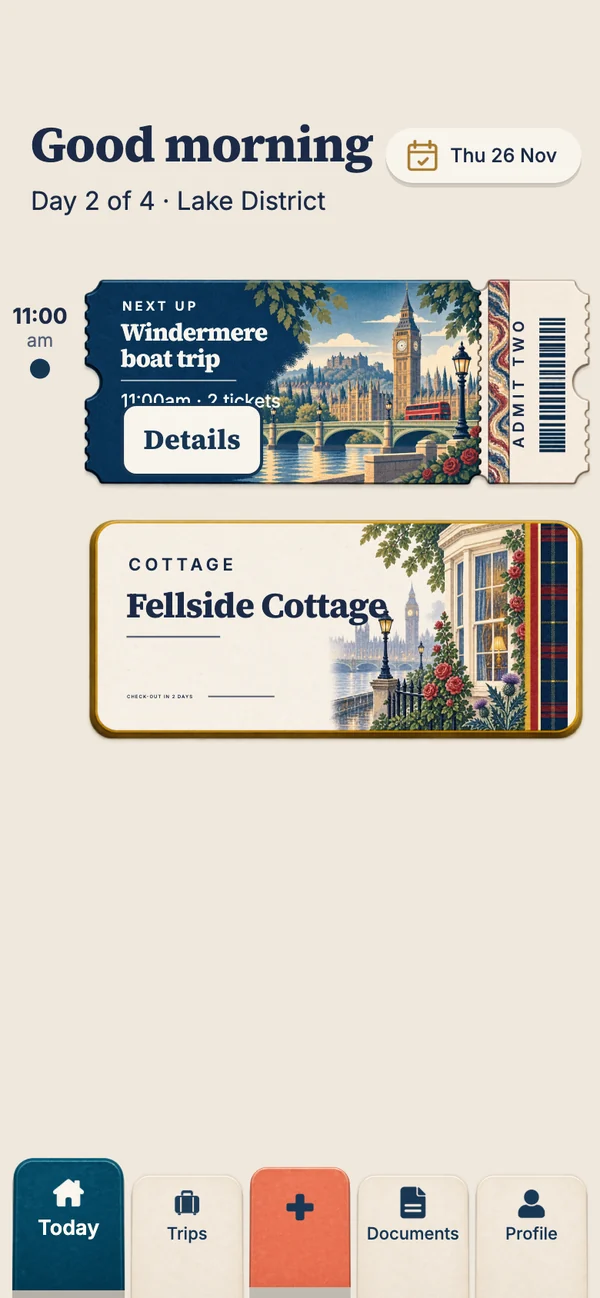
During a trip, Travary opens on today. The greeting, then the day's cards down a time rail: the featured ticket in its place in time, your stay's key card after it, then the day's tables and tours, with finished things folding away under "Earlier". Swipe for tomorrow, or tap the date for the whole trip's calendar.
Times are exactly as printed on the ticket, in the local time where they happen. A dinner at 7:30pm in Rome stays 7:30pm, whatever time zone your phone was in when you booked it. (Why that matters.)
4. Between trips, it counts down
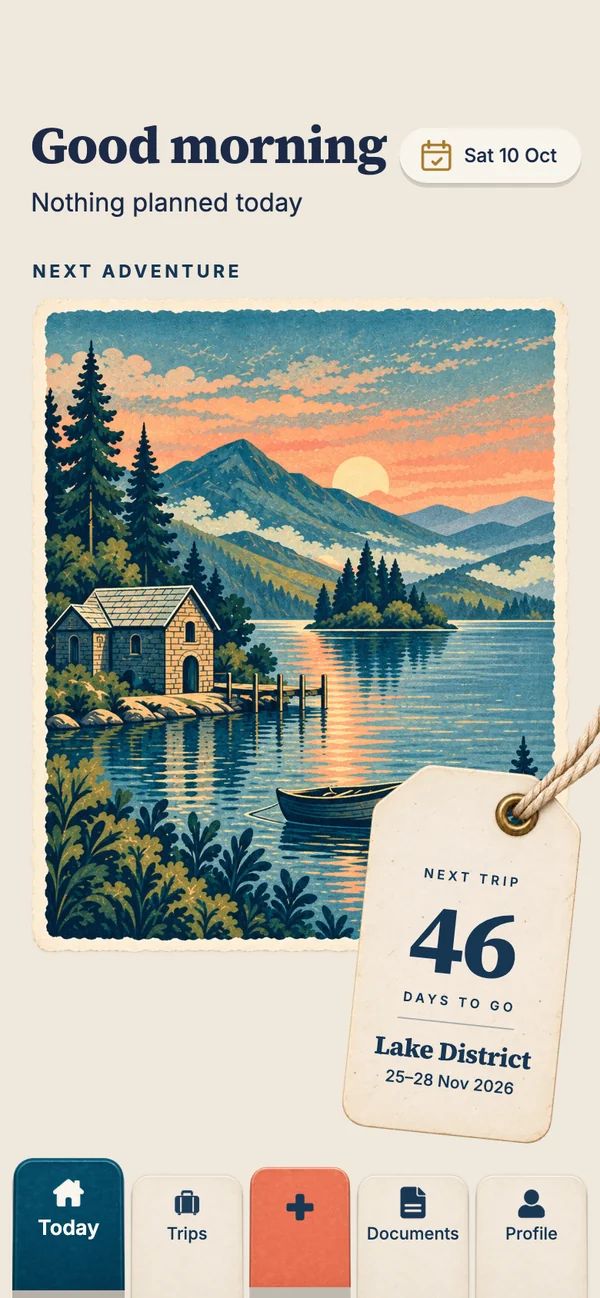
When you're not away, Today becomes a countdown to your next trip: that destination's postcard, as large as the screen allows, with a luggage tag counting the days. Every time you come back to the app, the postcard lifts in and the tag slaps on. If you want one for a trip before you've booked anything, the holiday countdown on this site makes one in your browser.
5. Inside a trip
Open a trip and its plan reads like a ledger, each booking on its date with its ticket on the row. What the trip still needs appears as dashed rows: nights without a stay, the flight out or home. Add it, or mark it "Not needed". Below that, Before you go is the trip's checklist for the jobs that aren't bookings, like the visa, the pet sitter or the travel money, each with an optional "by" date that can be weeks before the trip.
6. Documents and travel documents
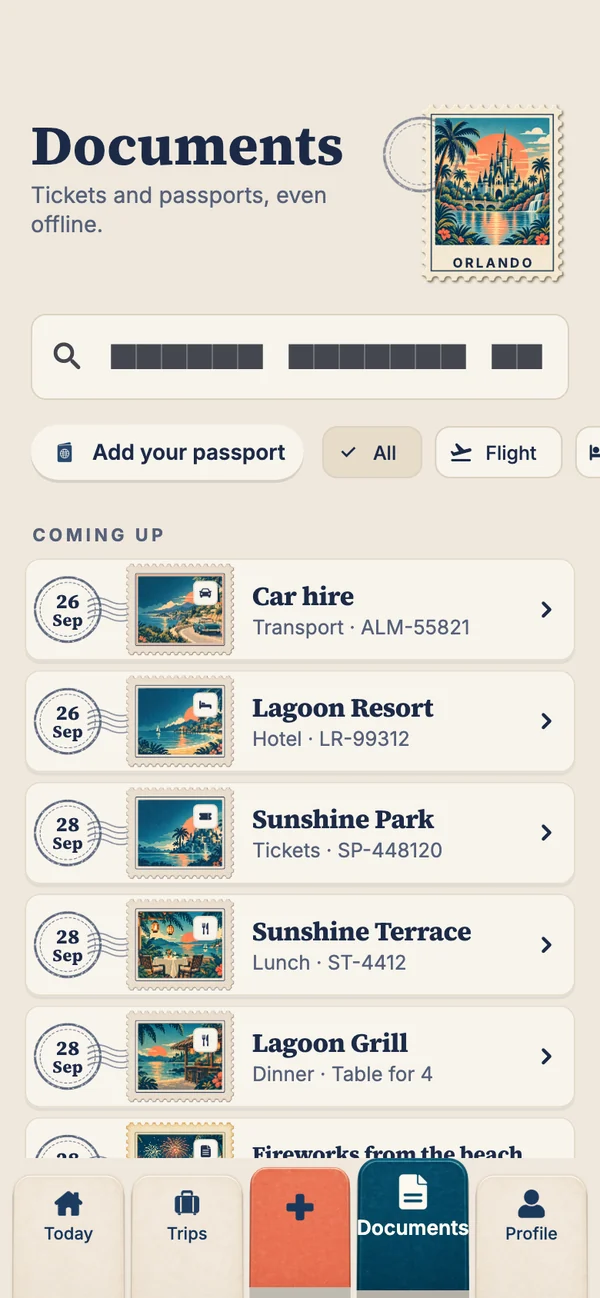
The Documents tab gathers every ticket and booking in one place, as postage-stamp rows, all available offline. Separately, Travel documents holds passports, visas and insurance: stored only on your phone, behind its own Face ID, fingerprint or passcode, and locked again whenever you leave the app. They're never uploaded, never shared with the family, never sent to Smart Import, and their numbers stay masked until you ask. Each passport is checked against your next trip, and flagged if it has less than six months left after the trip ends.
7. Bring the family
With a Holiday Pass or the Annual Pass, share a trip with up to six people, you included, by sending them a short code. Everyone sees the same days on their own phone, iPhone or Android, adds the bookings they made, and carries their own tickets, backed up so they open on every phone. A pass on a trip covers everyone on it.
What's free and what's not
| Free | Holiday Pass ($14.99 once) | Annual Pass ($34.99 a year) | |
|---|---|---|---|
| Trips and bookings | Unlimited | Unlimited | Unlimited |
| Today, countdown, calendar | ✓ | ✓ | ✓ |
| Tickets offline | ✓ | ✓ | ✓ |
| Travel documents | ✓ | ✓ | ✓ |
| Smart Import | 3 imports | Unlimited, that trip | Unlimited |
| Family sharing (up to 6) | — | That trip | Every trip you organise |
| Ticket backup | — | That trip | ✓ |
Launch prices in US dollars; the App Store and Google Play show your local price. A Holiday Pass covers one trip of up to 30 days. Your tickets, bookings, Today and travel documents are never locked, whatever your plan.
Questions people ask
Is Travary free?
Yes. Trips, bookings, Today, the countdown, tickets offline and travel documents are free and never locked. A Holiday Pass or Annual Pass adds family sharing, ticket backup and unlimited Smart Import.
Does Travary work on Android?
Yes, Travary is built for iPhone and Android, so families with a mix of phones can share the same trip.
How do I add bookings to Travary?
Type them in (only a title and date are required), or pick a screenshot, photo or PDF of the confirmation and Smart Import reads it into a booking for you to check.
Does Travary read my email?
No. Travary doesn't connect to your inbox. You add bookings yourself, or from a screenshot or PDF you choose.
Where does Travary store my passport?
Only on your phone, in the app's private storage, behind your phone's own Face ID, fingerprint or passcode. It's never uploaded or shared.
When is Travary available?
Travary is coming soon to the App Store and Google Play.