
Holiday organiser · iPhone & Android
Your holiday, sorted into days.
Add your bookings once: flights, stays, tickets, tables, the hire car. Travary puts them in order, a day at a time, and opens each morning on what you need right now, with tickets one tap away. Even with no signal.
Try the free holiday countdown →Get the printable itinerary template →
- No trip to set up first
- Works offline
- Passports stay on your phone
- iPhone and Android
 Kyoto
Kyoto

How it works
Three steps, and the first is the only work.
No folders to file things in and no trip to set up before you start. Add what you've booked; Travary works out the rest.

Add a booking
Type it in, or add a screenshot or PDF of the confirmation and let Smart Import read it. Only a title and a date are ever required.

The trip forms itself
Bookings group into trips by their dates, and the destination is read from the name. Prefer to start with a name and dates? You can.

Today opens on now
Each morning starts on the day's plan: what's next, where you're sleeping, the tables you've booked. Tomorrow is a swipe away.
Today
Built for the morning of, not just the planning.
Most travel apps are built for researching a trip. Travary is built for being on one. During a holiday it opens on today; before it, on the first day of the next trip. The day's cards run down a time rail: the next ticket in its place, your stay's key card after it, then the tables and tours, with finished things folding away under "Earlier".
- Tickets one tap away, offline
- Times exactly as printed on the ticket, in the local time where they happen
- Swipe for tomorrow, or tap the date for the whole trip

Between trips
When you're home, it counts down.
Between holidays, Today becomes a postcard from wherever you're going next, with a luggage tag counting the days. It slaps on fresh every time you open the app, which is a small thing that makes the wait feel shorter.

Inside a trip
Every trip on one page, with the gaps spotted for you.
Open a trip and your plan reads like a ledger: each booking on its date, its ticket on the row. Travary notices what's missing, like nights without a stay or the flight home, and the trip's "Before you go" list keeps the to-dos that aren't bookings, like the visa, the pet sitter and the travel money, in the same place.
- Nights without a stay and the missing flight home, flagged
- A shared "Before you go" checklist with "by" dates
- Dates kept honest: bookings stay inside their trip
Kyoto in spring
10–17 Apr · 4 people- 10 Apr
 Flight to Osaka11:05 · 2 checked bagsQZ7K2P
 - 11 Apr
 Machiya townhouseCheck in 3:00pm · 4 nightsMT-2214
 - 13 Apr
 Tea ceremony10:30am · 4 peopleTC-118
 - 2 nights without a stay · 15–16 AprAddNot needed
- The flight homeAddNot needed
Before you go
- Book the dog sitterby 1 Apr
- Order yen for the first dayby 8 Apr
- Check everyone's passport
Travel documents
Your passport stays on your phone. Only your phone.
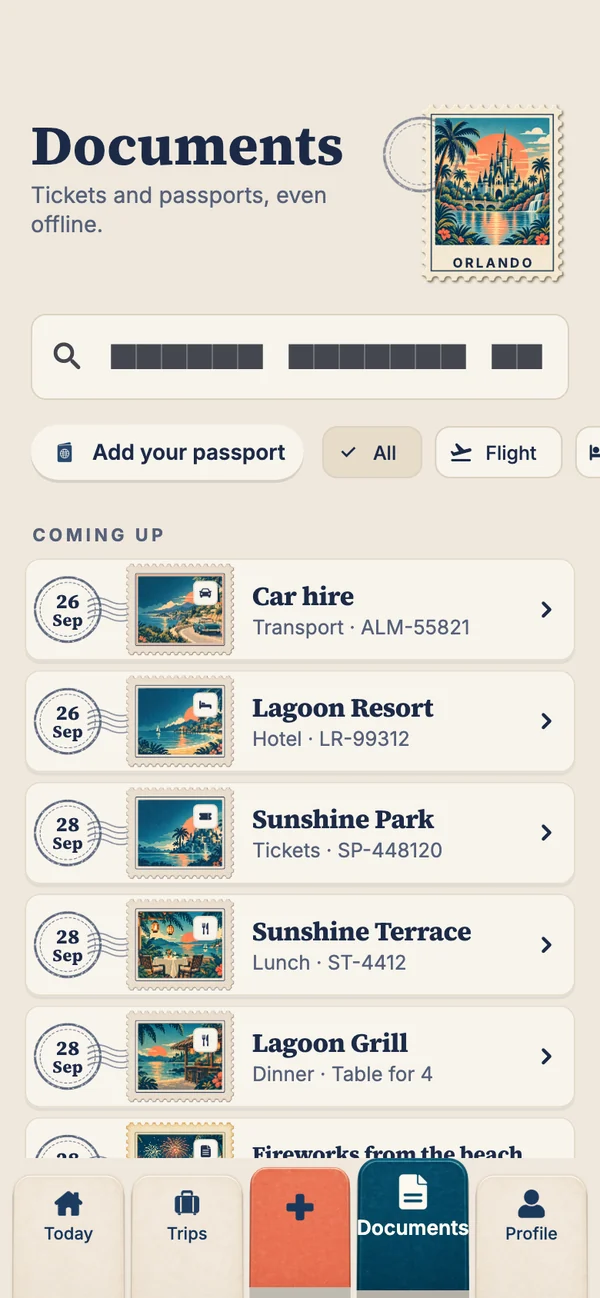
Passports, visas and insurance live in Travel documents: stored only on this phone, behind its own Face ID, fingerprint or passcode, and locked again the moment you leave the app. They're never uploaded, never shared with the family and never read by AI. Travary checks each one against your next trip, so a passport that runs out too soon is spotted while there's still time to renew.
- Numbers stay masked until you ask
- Expiry checked against the next trip's dates
- Every ticket and booking in the Documents tab, offline
And the details
Small things that matter on the day.

Snap it, check it, done
Pick a screenshot, photo or PDF of a confirmation and Smart Import reads it into a booking for you to check. The dates and times are always highlighted, and nothing is saved until you've looked.
3 free imports. Unlimited with a pass.

Everyone on the same page
Share a trip with up to six people, you included. Everyone sees the same days, adds what they booked themselves, and carries their own tickets, on iPhone or Android.
With a Holiday Pass or the Annual Pass.

Right when there's no signal
Your plan and tickets are kept on your phone, so they open at the gate, on the ferry and in the queue. Times stay exactly as printed, in the local time of the place they happen.
Free, on every plan.
Made for where you're going
Every destination gets its own look.
Travary recognises where you're headed and dresses the trip to suit: postcards, ticket art and colours drawn for thirty places so far, with more on the way. Nowhere in particular? There's a postcard for that too.






























Plans
Free to organise. Never a lock on your tickets.
Everything you need for your own holiday is free. A pass adds the family and the extras, for one holiday or for the year.
Free
Travary
$0
- Unlimited trips and bookings
- Today, the countdown and the trip calendar
- Tickets and bookings offline
- Travel documents with expiry checks
- 3 Smart Imports
One holiday
Holiday Pass
$14.99 once
- Family sharing, up to six people a trip
- Everyone's tickets backed up and on their phones
- Unlimited Smart Import for that trip
- A single payment, not a subscription
Every holiday
Annual Pass
$34.99 a year
- Everything in the Holiday Pass
- On every trip you organise all year
- Unlimited Smart Import
- Everyone you invite shares it on that trip
Your tickets, bookings, Today and travel documents are never locked, whatever your plan. Launch prices in US dollars; the App Store and Google Play show your local price. A Holiday Pass covers one trip of up to 30 days.
The planning desk
Plan it properly, without the spreadsheet.
Practical guides to the parts of a holiday that trip people up: building the itinerary, the checklist before you leave, reading flight times, passport rules and the apps that help.
Plan the holiday
How to make a travel itinerary, step by step
Plan the holiday
Things to do before going on holiday: the complete checklist
 Flights and the day you fly
Are flight times local? How to read departure and arrival times
Passports and documents
The six-month passport rule: which countries need it, and how to check
Apps and tools
The best itinerary apps in 2026, compared honestly
Plan the holiday
Family holiday checklist: everything to sort before you go with kids
Flights and the day you fly
Are flight times local? How to read departure and arrival times
Passports and documents
The six-month passport rule: which countries need it, and how to check
Apps and tools
The best itinerary apps in 2026, compared honestly
Plan the holiday
Family holiday checklist: everything to sort before you go with kids
Itineraries
Sample holidays, a day at a time.
Laid out the way Travary lays out a trip, with the timed things in order and room left to breathe.
Questions
Good to know
What is Travary?
Travary is a holiday organiser for iPhone and Android. You add your bookings (flights, stays, tickets, restaurant tables, hire cars, notes) and it sorts them into days, forms the trip from their dates, counts down to it, and opens each morning on what you need right now.
Do I have to create a trip first?
No. Add a booking and Travary forms the trip from its dates. If you'd rather start with a name and dates, you can, and Travary then keeps that trip's bookings to its days.
Does Travary work offline?
Yes. Your bookings and tickets live on your phone, so the day's plan and your tickets open with no signal, which is usually when you need them.
Is Travary free?
Yes. Trips, bookings, Today, the countdown, your tickets and travel documents are free and never locked. A Holiday Pass ($14.99 for one holiday) or the Annual Pass ($34.99 a year) adds family sharing, ticket backup and unlimited Smart Import. Prices are in US dollars; your store shows your local price.
Can my family see the plan too?
Yes, with a Holiday Pass or the Annual Pass. Invite up to six people to a trip and everyone sees the same days, with the tickets on their own phones. A pass on a trip covers everyone on it.
Where are my passport details stored?
Only on your phone, behind its own Face ID, fingerprint or passcode. Travel documents are never uploaded, never shared with the family and never sent to Smart Import.
When can I download Travary?
Travary is coming soon to the App Store and Google Play. Join the waiting list and we'll email you the download link the day it's out. Until then, the free holiday countdown and itinerary template on this site work in any browser.

Coming soon
Travary is nearly packed.
Travary arrives on the App Store and Google Play soon. Join the waiting list and we'll email you the download link the day it's out. In the meantime, count down to your next trip or print an itinerary with the free tools.